Generate, translate, sync movie and TV subtitles in minutes — powered by AI, running locally on your Mac or PC.
✓Fast ✓Offline ✓No subscription
Available for Windows and MacOS
Unlike generic transcription tools, Subtitle Creator is optimized specifically for movie and TV content
Create missing subtitles – Create missing subtitles locally on your PC or Mac with AI
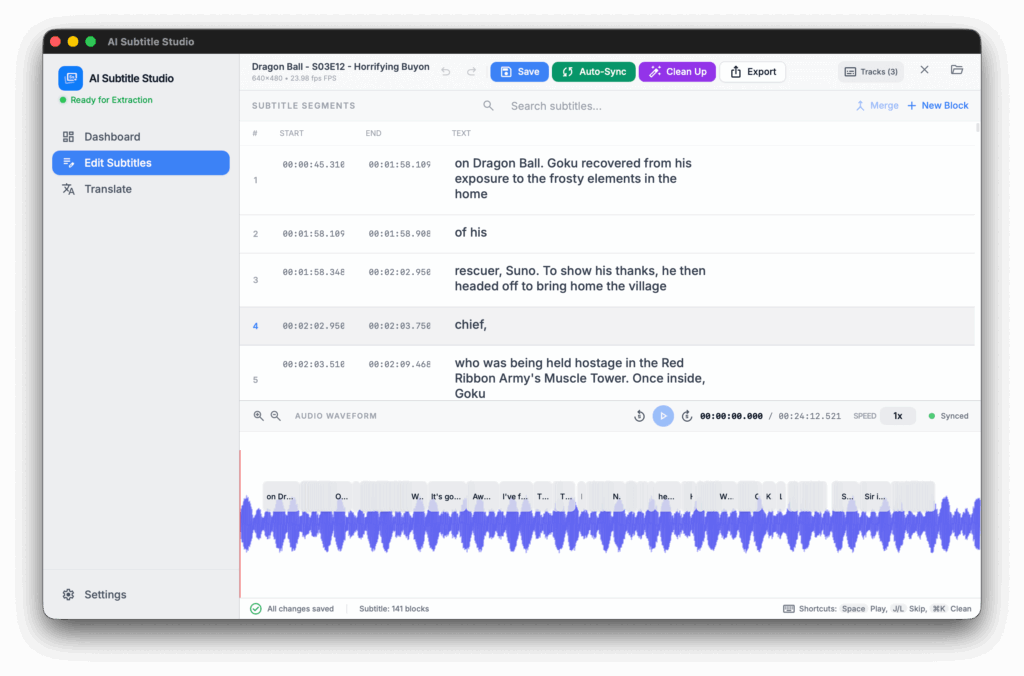
Edit subtitles – Clean up subtitle files with our powerfull tools
Translate subtitles – Translate subtitles to any language you want with *AI
Batch processing – Drag and drop folders into the app and click the Create button to start batch generating subtitles. Ideal for TV Shows
Support for multiple models – Choose the right AI model for the best speed and accuracy balance
Fine tuning – Power users can adjust multiple settings for even better results
*To use AI Translation, you’ll need an API key from an LLM provider.
AI-Powered Transcription & Translation
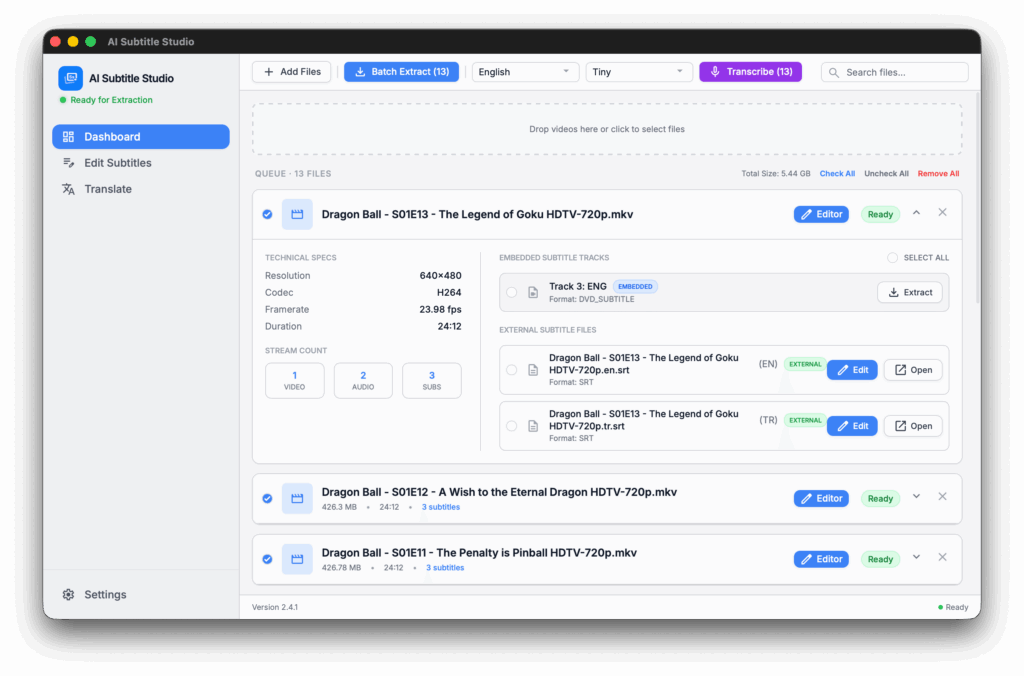
- Transcribe Any Language with AI – Automatically convert speech to text from over 90 languages using high-accuracy AI models.
- Universal AI Translation – Translate your subtitles from any language to any language using advanced AI models (e.g., DeepSeek). This feature requires your own AI API keys to ensure private and unlimited processing.
- Contextual Dialogue Awareness – Uses deep-learning to understand the flow of conversation, ensuring that proper nouns, technical terms, and slang are captured accurately.
- Acoustic Filtering – Intelligent noise reduction that ignores background music and sound effects to focus purely on the dialogue.
- Seamless Integration – Transcribed text is instantly loaded into the editor with perfectly synced timestamps, ready for cleaning or translation.
If your subtitle file doesn’t match your video, AI Subtitle Studio includes a specialized Subsync integration to fix timing issues automatically.
Visual Verification – Once synced, the new timings are reflected on the audio waveform, allowing you to double-check the alignment before saving.
Acoustic Fingerprinting – The tool “listens” to the audio track of your video and compares it to the timestamps in your subtitle file.
Fix Audio Drift – Automatically repairs subtitles that start correctly but slowly lose sync over time due to frame rate differences (e.g., 23.976fps vs 25fps).
Automatic Offset Detection – Corrects constant delays (e.g., subtitles starting 5 seconds too late) in seconds without manual adjustment.
Automated Subtitle Syncing (Subsync)
AI Cleanup & Repair
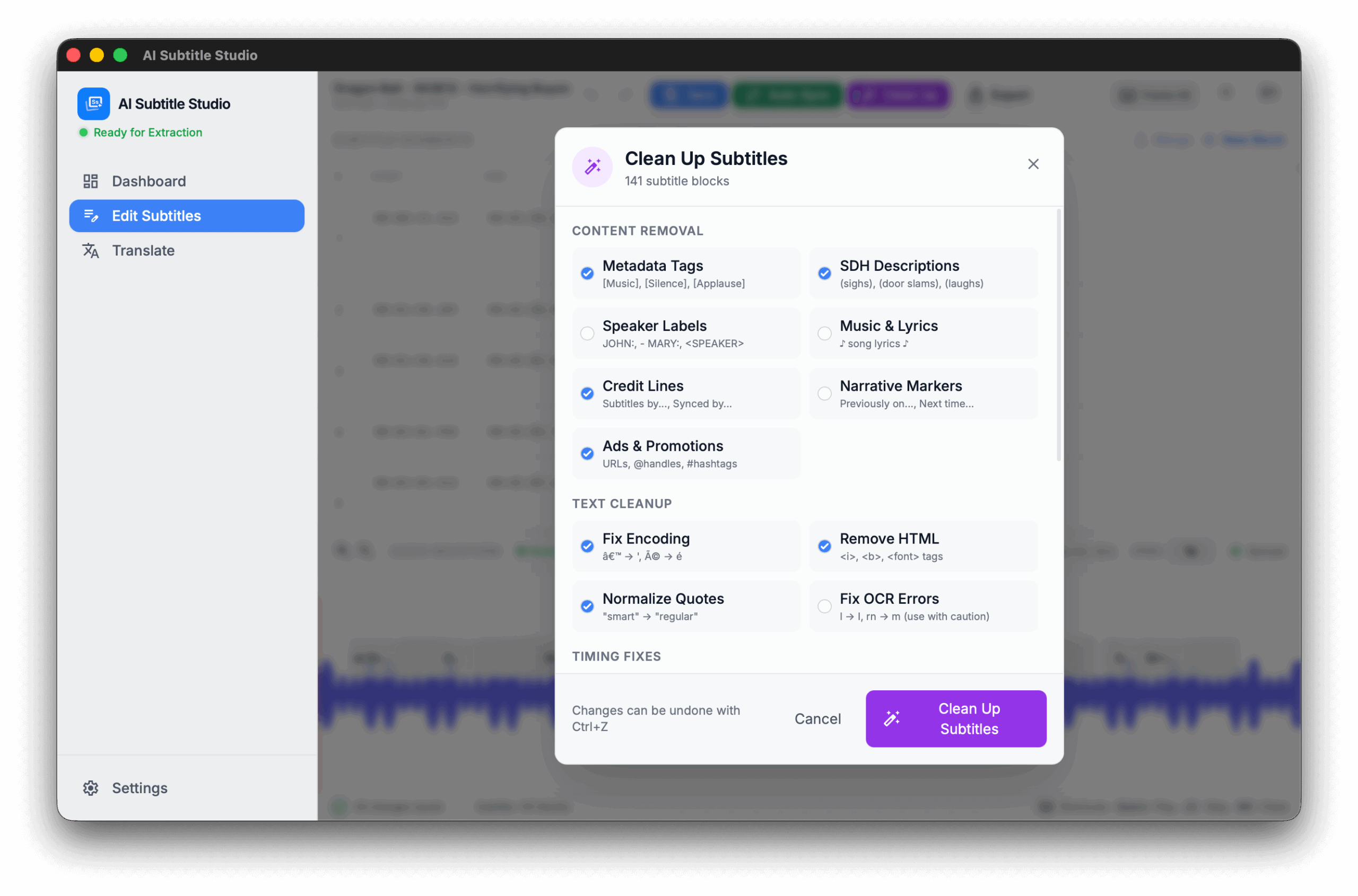
The Studio uses a sophisticated subtitle processor to polish your files:
Overlap & Duration Control – Ensures every subtitle stays on screen for a minimum readable duration and never overlaps with the next line.
Remove SDH & Metadata – Strips out non-dialogue descriptions like [Music playing] or (Door slams) with one click.
Fix “Mojibake” Encoding – Automatically repairs broken characters (like é becoming é) caused by incorrect file encoding.
Smart OCR Correction – Cleans up common errors found in “ripped” image subtitles, such as mistaking the letter l for I.
Your videos never leave your device:
One-Time Purchase – No subscriptions, no monthly fees
No Cloud Uploads – Everything processes locally on your computer
No Internet Required – Works completely offline after initial setup
Your Data, Your Control – No tracking, no servers, no privacy concerns
100% Private & Local