AI Subtitle Creator needs a few helper tools (dependencies) on your computer so it can open videos, read their contents, and turn speech into subtitles.This manual explains, in plain language, which tools you’ll be asked to install, what they are, why the app needs them, and what they do for you.
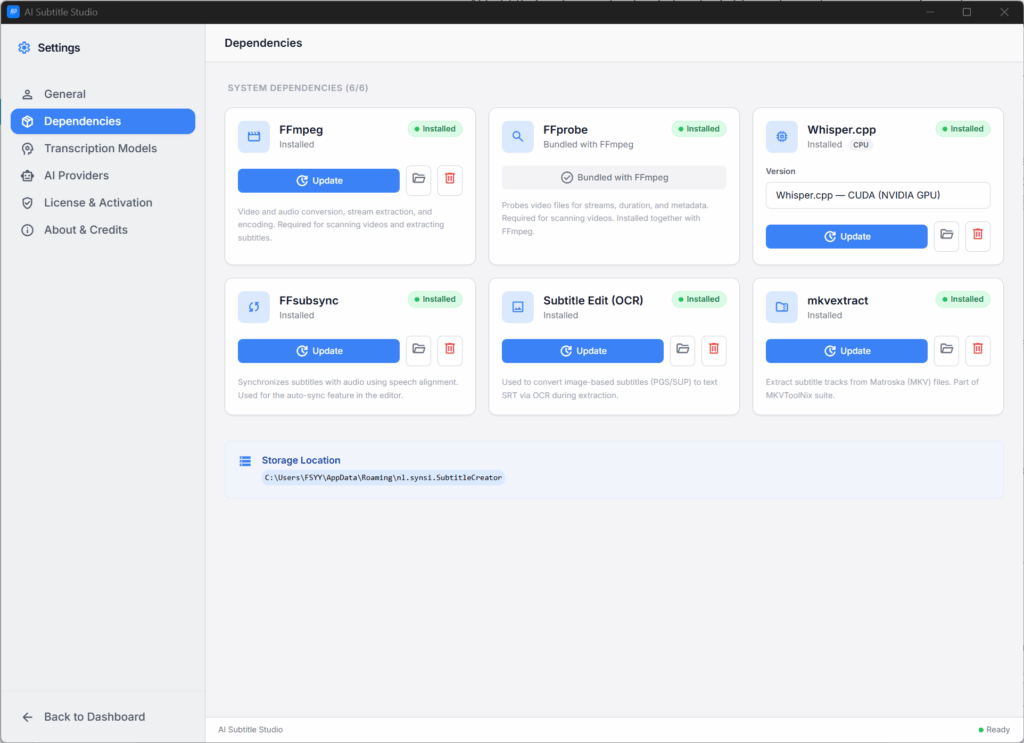
FFmpeg and FFprobe
FFmpeg and FFprobe are small programs that specialise in working with video and audio files. Think of them as a “video inspector” and “video toolbox” for your computer. AI Subtitle Creator uses these tools to understand your video files and to pull subtitles out of them. Without them, the app can’t reliably see what’s inside a video.What they’re used for in the app
- Checking what’s inside a video:
- How long it is
- What resolution it has
- How many audio and subtitle tracks it contains
- Extracting embedded subtitles from a video and saving them as separate subtitle files (for example .srt).
- Powering features like:
- Scanning video files on the Dashboard
- Showing you which subtitle tracks are available
- Letting you click “Extract” to save those tracks.
You’ll usually install FFmpeg/FFprobe once, and then the app can use them in the background whenever you add or scan videos.
Whisper core (Whisper++ / Whisper.cpp)
Whisper is an AI system that listens to speech and turns it into text.In this app, it runs locally on your computer (often called Whisper++ or Whisper.cpp), so your videos don’t have to be uploaded anywhere. This is the part that actually “hears” the audio in your video and writes out the first version of your subtitles. Without Whisper, the app wouldn’t be able to create subtitles from scratch.What it’s used for in the app
- Turning the spoken audio in your video into text subtitles.
- Powering the “Transcribe” button on the Dashboard.
- Giving you a starting subtitle file that you can then edit, polish, and translate.
Once Whisper is installed, you won’t interact with it directly; you just click “Transcribe”, and it works behind the scenes.
Whisper models (Tiny, Base, Small, Medium, Large)
Whisper needs a “model file” to recognise speech. The app offers several sizes, usually called Tiny, Base, Small, Medium, and Large.
- Smaller models: faster, use less memory, but a bit less accurate.
- Larger models: slower, use more memory, but usually more accurate.
The core Whisper program can’t do anything without at least one model file. These models are what actually know how to understand human speech.
- When you choose a model in the app’s settings, that’s the one used whenever you click “Transcribe”.
- The model you pick affects:
- How long transcription takes
- How good the subtitles look, especially on difficult audio
If no model is installed, the app will warn you and the Transcribe button will be disabled until you download one.
Optional: GPU / hardware acceleration
On some computers, the app can use your graphics card (GPU) to speed up heavy work such as transcription and video processing. If you work with long movies or big batches of files, using your GPU can make things noticeably faster and smoother.
- Speeding up Whisper when it turns audio into subtitles.
- Speeding up some of the work FFmpeg does on video and audio.
This is optional; the app will still work without GPU support, just more slowly on large jobs.
DeepSeek API key (for AI translation and cleanup)
What it isDeepSeek is an online AI service. You get an API key (a kind of password) from DeepSeek’s website and paste it into the app.Why the app needs itThe app uses this key to securely talk to DeepSeek’s servers and ask them to translate or improve subtitles for you.
- Automatically translating subtitles into other languages on the Translation screen.
- Cleaning up raw Whisper subtitles:
- Fixing punctuation and casing
- Smoothing out awkward phrases
- Generating smart “vocabulary hints” (character names, places, special terms) to help Whisper hear tricky names correctly.
If you don’t add a DeepSeek key, the core features (scanning, extraction, offline transcription) still work, but the AI translation and cleanup buttons will be disabled or show a message asking you to configure a key.
Summary
As a user, the main things you may be asked to install or configure are:
- FFmpeg / FFprobe: to inspect videos and extract subtitle tracks.
- Whisper core and a Whisper model: to create subtitles from the audio in your videos.
- (Optional) GPU support: to speed up heavy tasks.
- (Optional) DeepSeek API key: to translate and clean up subtitles with cloud AI.
Everything else runs behind the scenes; you just work with the buttons and settings inside the app.